# Test Assignment

You are here: [My Training](/nexport-user-documentation/administrator-documentation/administrator-reference/my-training-admin.md) > [Instructor](/nexport-user-documentation/administrator-documentation/administrator-reference/my-training-admin/instructor.md) > [Assignment Types](/nexport-user-documentation/administrator-documentation/administrator-reference/my-training-admin/instructor/assignments/assignment-feedback-1.md) > Test Assignment

### Test assignment <a href="#test_assignment" id="test_assignment"></a>

The test assignments can be set as either graded or ungraded assignments. Test questions are always randomized by default. You can restrict the time a student has to take a test with assessment time limits or set test time limits with a live countdown on the test interface page. You can also allow multiple attempts to give the students the opportunity to re-take tests. You can also allow unlimited test attempts or set a maximum attempt limit.

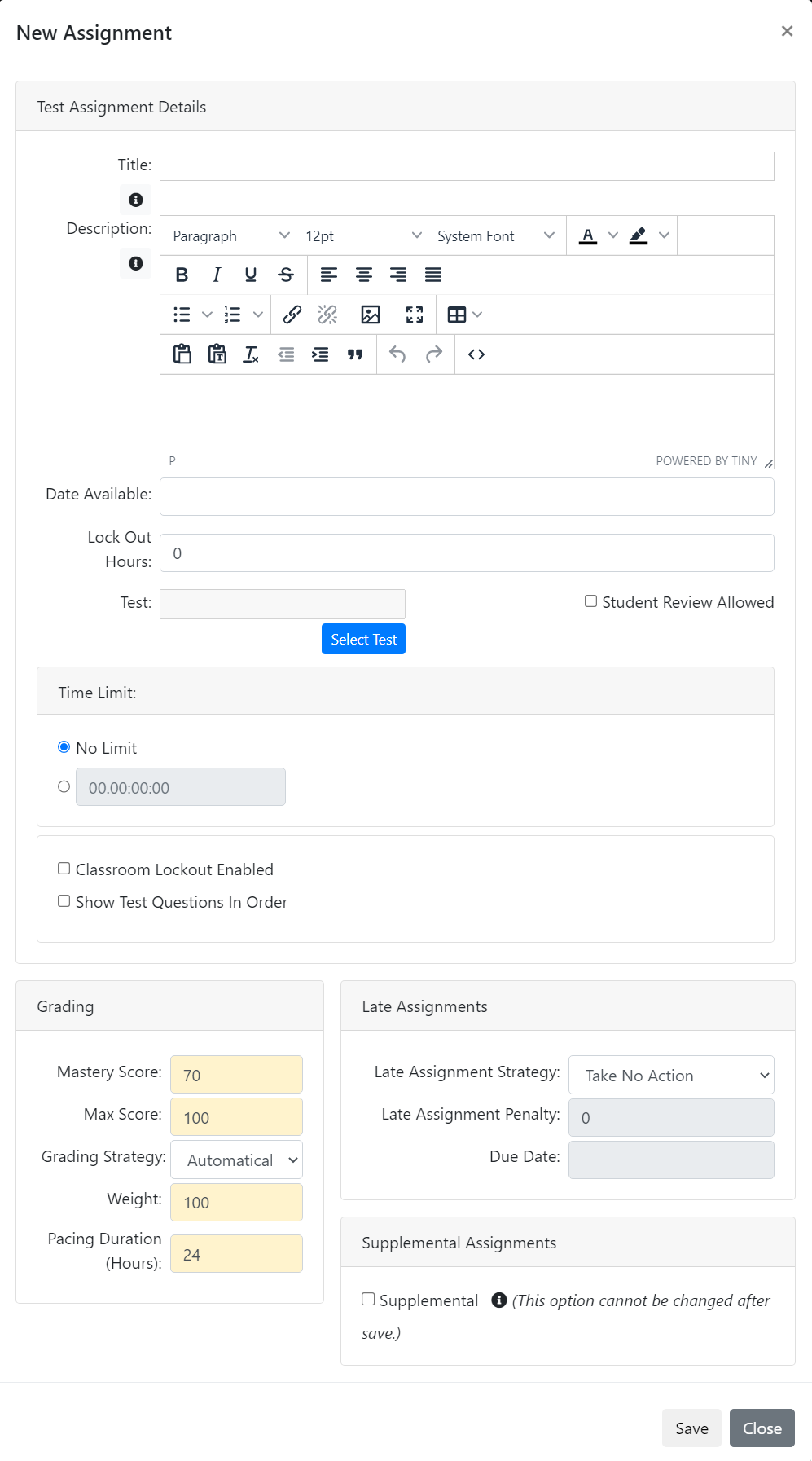
The following image illustrates the test assignment type.

<figure><img src="/files/I7zFQoZUZLzbm1BYjqF7" alt=""><figcaption></figcaption></figure>

The following table provides explanation for the user inputs that are required for the various sections and fields to manage test assignment.

| Section                                                           | Field                                                                                                                                                                                                                                                                                                                                                                                                                                                                                                                                                                                                                                                                                                                                                                                                                                                                                                                                                                                                                                                                        | Action or Description                                                                                                                                                                                                                                                                                                                                                                                                                                                                                                    |
| ----------------------------------------------------------------- | ---------------------------------------------------------------------------------------------------------------------------------------------------------------------------------------------------------------------------------------------------------------------------------------------------------------------------------------------------------------------------------------------------------------------------------------------------------------------------------------------------------------------------------------------------------------------------------------------------------------------------------------------------------------------------------------------------------------------------------------------------------------------------------------------------------------------------------------------------------------------------------------------------------------------------------------------------------------------------------------------------------------------------------------------------------------------------- | ------------------------------------------------------------------------------------------------------------------------------------------------------------------------------------------------------------------------------------------------------------------------------------------------------------------------------------------------------------------------------------------------------------------------------------------------------------------------------------------------------------------------ |
| <mark style="color:blue;">**Assignment Details**</mark>           | **Title**                                                                                                                                                                                                                                                                                                                                                                                                                                                                                                                                                                                                                                                                                                                                                                                                                                                                                                                                                                                                                                                                    | <p>In the Rich Text Editor area, type a title for the test assignment. You can apply italic and bold styles to assignment title.</p><p>Note:</p><p>This is a mandatory field.</p>                                                                                                                                                                                                                                                                                                                                        |
| <mark style="color:blue;">**Description**</mark>                  | <p>In the Rich Text Editor area, type description related to the test assignment.</p><p>Note:</p><p>In the <strong>Assignment Details</strong>section, click the <img src="https://www.nexportcampus.com/Content/Guides/aweb/Content/Resources/Images/Common_Screens_Icons/Template_Properties.png" alt=""> icon. The <strong>Assignment Template Reference</strong> page is displayed. Select the required <a href="http://velocity.apache.org/engine/1.6/user-guide.html">Velocity Template Language (VTL)</a> property and copy-paste it in the Rich Text Editor area. If you place the name of a field after a $, it is replaced with the information that field represents. For example, ‘Welcome to $OrganizationName’ changes to ‘Welcome to NexPort’, if the organization name is 'NexPort'.</p><p>For more information about adding content and applying formatting to the content in the Rich Text Editor area, see <a href="https://www.nexportcampus.com/Content/Guides/aweb/Content/Get_Started/Use_the_Rich_Text_Editor.htm">Use the Rich Text Editor</a>.</p> |                                                                                                                                                                                                                                                                                                                                                                                                                                                                                                                          |
| <mark style="color:blue;">**Test**</mark>                         | <p><strong>To upload a test:</strong></p><ol><li>Click <strong>Select Test</strong>.</li><li>The <strong>Find Test</strong> dialog box is displayed.</li><li>Click <strong>Select</strong> link next to the test that you need to add as a test assignment.</li><li>Note:</li><li>To search a test, in the <strong>Search</strong> box, type first few characters of the test that you need to search, and then click <strong>Search</strong>.</li></ol>                                                                                                                                                                                                                                                                                                                                                                                                                                                                                                                                                                                                                     |                                                                                                                                                                                                                                                                                                                                                                                                                                                                                                                          |
| <mark style="color:blue;">**Student review Allowed**</mark>       | Select the **Allowed** check box, to allow students to review their test assignment responses and the correct answers.                                                                                                                                                                                                                                                                                                                                                                                                                                                                                                                                                                                                                                                                                                                                                                                                                                                                                                                                                       |                                                                                                                                                                                                                                                                                                                                                                                                                                                                                                                          |
| <mark style="color:blue;">**Attempt Limit**</mark>                | <p>In the <strong>Attempt Limit</strong> area, do on of the following:</p><ul><li>Click <strong>Unlimited Attempts</strong>.</li><li>No attempt limit is set for the students to attempt an assignment.</li><li>or</li><li>Click and in the box, type a numerical value to set the number of attempts allowed for the students to attempt an assignment.</li></ul>                                                                                                                                                                                                                                                                                                                                                                                                                                                                                                                                                                                                                                                                                                           |                                                                                                                                                                                                                                                                                                                                                                                                                                                                                                                          |
| <mark style="color:blue;">**Time Limit**</mark>                   | <p>In the <strong>Time Limit</strong> area, do on of the following:</p><ul><li>Click <strong>No Limit</strong>.</li><li>No time frame is set for students to complete the assignment.</li><li>or</li><li>Click and in the <strong>hrs</strong> box and <strong>min</strong> box, type specified hours and minutes in which students must complete the assignment.</li><li>Note:</li><li>The test cannot exceed 23 hours and 59 minutes. You must include both hours and minutes. The hour can be set at 0, but there must be a numeric value in the text box provided.</li></ul>                                                                                                                                                                                                                                                                                                                                                                                                                                                                                             |                                                                                                                                                                                                                                                                                                                                                                                                                                                                                                                          |
| <mark style="color:blue;">**Waiting Period**</mark>               | <p>Waiting periods allow you to specify a different period of time that must pass between subsequent test attempts.</p><p>For instance you can specify that the student must:</p><ul><li>Wait one day between attempt one and attempt two</li><li>Wait three days between attempt two and attempt three</li><li>Wait one day between attempt three and attempt four</li><li>and so on</li></ul>                                                                                                                                                                                                                                                                                                                                                                                                                                                                                                                                                                                                                                                                              |                                                                                                                                                                                                                                                                                                                                                                                                                                                                                                                          |
| <mark style="color:blue;">**Date Available**</mark>               | In the **Date Available** box, enter the available assignment date and time in MM/DD/YYYY, HH:MM format with time zone. By default, the current date appears as the available assignment date. You can select the current date or any future date as an available assignment date.                                                                                                                                                                                                                                                                                                                                                                                                                                                                                                                                                                                                                                                                                                                                                                                           |                                                                                                                                                                                                                                                                                                                                                                                                                                                                                                                          |
| <mark style="color:blue;">**Classroom Lockout Enabled**</mark>    | Select the **Classroom Lockout Enabled** check box, the student gets locked out of the classroom materials while they are taking the test.                                                                                                                                                                                                                                                                                                                                                                                                                                                                                                                                                                                                                                                                                                                                                                                                                                                                                                                                   |                                                                                                                                                                                                                                                                                                                                                                                                                                                                                                                          |
| <mark style="color:blue;">**Lock Out Hours**</mark>               | In the **Lock Out Hours** box, enter a specific number (in hours) to lock out the period an assignment for the student.                                                                                                                                                                                                                                                                                                                                                                                                                                                                                                                                                                                                                                                                                                                                                                                                                                                                                                                                                      |                                                                                                                                                                                                                                                                                                                                                                                                                                                                                                                          |
| <mark style="color:blue;">**Show Test Questions In Order**</mark> | Select the **Show Test Questions In Order** check box, forces NexPort to use the ordering specified in the question banks and test definition. By default NexPort randomize the test question ordering each time a test is launched.                                                                                                                                                                                                                                                                                                                                                                                                                                                                                                                                                                                                                                                                                                                                                                                                                                         |                                                                                                                                                                                                                                                                                                                                                                                                                                                                                                                          |
| <mark style="color:blue;">**Grading**</mark>                      | **Mastery Score**                                                                                                                                                                                                                                                                                                                                                                                                                                                                                                                                                                                                                                                                                                                                                                                                                                                                                                                                                                                                                                                            | <p>Type a numerical value to set the mastery score. The mastery score indicates the minimum score to pass the Courseware assignment. For example, type a mastery score of 70 to indicate a 70 per cent is the passing mark for the Courseware assignment.</p><p>If you do not define a mastery score, NexPort Campus automatically calculates the points scored, but marks the student's Test assignment attempt as completed.</p><p>Note:</p><p>This is a mandatory field.</p>                                          |
| <mark style="color:blue;">**Max Score**</mark>                    | <p>The maximum score that the test assignment returns. The max score value is used to calculate a normalized score for the assignment.</p><p>Note:</p><p>This is a mandatory field.</p>                                                                                                                                                                                                                                                                                                                                                                                                                                                                                                                                                                                                                                                                                                                                                                                                                                                                                      |                                                                                                                                                                                                                                                                                                                                                                                                                                                                                                                          |
| <mark style="color:blue;">**Grading Strategy**</mark>             | <p>Determines whether a grade must be given by the Instructor, NexPort automatically assign a grade or no grade is recorded.</p><p>Note:</p><p>If ‘No Grade’ is selected for an assignment then the score is displayed as -/- in the Gradebook view for those assignments.</p>                                                                                                                                                                                                                                                                                                                                                                                                                                                                                                                                                                                                                                                                                                                                                                                               |                                                                                                                                                                                                                                                                                                                                                                                                                                                                                                                          |
| <mark style="color:blue;">**Weight**</mark>                       | Used to calculate the final section score, this is the relative weight to give this assignment in relation to the other assignment weights within the section.                                                                                                                                                                                                                                                                                                                                                                                                                                                                                                                                                                                                                                                                                                                                                                                                                                                                                                               |                                                                                                                                                                                                                                                                                                                                                                                                                                                                                                                          |
| <mark style="color:blue;">**Pacing Duration (Hours)**</mark>      | <p>Virtual hours that can be used to control the percentage complete that is calculated in NexPort. If all assignments are set to 1 then the pacing is set across the assignments.</p><p>Note:</p><p>This is a mandatory field.</p>                                                                                                                                                                                                                                                                                                                                                                                                                                                                                                                                                                                                                                                                                                                                                                                                                                          |                                                                                                                                                                                                                                                                                                                                                                                                                                                                                                                          |
| <mark style="color:blue;">**Late Assignment**</mark>              | **Late Assignment Strategy**                                                                                                                                                                                                                                                                                                                                                                                                                                                                                                                                                                                                                                                                                                                                                                                                                                                                                                                                                                                                                                                 | <p>In the <strong>Late Assignment Strategy</strong> list, enter one of the following:</p><ul><li><strong>FailAfterDueDate:</strong> If selected then the assignment is marked as failed as soon as the assignment due date is passed.</li><li>or</li><li><strong>ApplyPenalty:</strong> If selected, NexPort subtracts the number of points from a late assignment.</li><li>or</li><li><strong>TakeNoAction (default):</strong> If selected, the student is not penalized for passing the assignment due date.</li></ul> |
| <mark style="color:blue;">**Late Assignment Penalty**</mark>      | <p>In the <strong>Last Assignment Penalty</strong> box, type the points to subtract if the assignment is not complete by the due date. This only applies if the <strong>Apply Penalty</strong> option is selected.</p><p>Note:</p><p>This is a mandatory field.</p>                                                                                                                                                                                                                                                                                                                                                                                                                                                                                                                                                                                                                                                                                                                                                                                                          |                                                                                                                                                                                                                                                                                                                                                                                                                                                                                                                          |
| <mark style="color:blue;">**Due Date**</mark>                     | <p>In the <strong>Due Date</strong> box, enter due date and time of the assignment in MM/DD/YYYY, HH:MM format with time zone. By default, the current date appears as the due date. You can select the current date or any future date as a due date.</p><p>In Gradebook, the student’s assignment is marked as late, if the student completes the assignment after the due date.</p><p>Note:</p><p>The <strong>Due Date</strong> box is enabled, when you enter FailAfterDueDate in the <strong>Late Assignment Strategy</strong> list.</p>                                                                                                                                                                                                                                                                                                                                                                                                                                                                                                                                |                                                                                                                                                                                                                                                                                                                                                                                                                                                                                                                          |
| <mark style="color:blue;">**Supplemental Assignment**</mark>      | When an assignment is marked as supplemental, it will be hidden to students **unless** you assign it to them. This can be useful when an assignment should only be assigned as needed.                                                                                                                                                                                                                                                                                                                                                                                                                                                                                                                                                                                                                                                                                                                                                                                                                                                                                       | **Note: Marking an assignment as supplemental is a&#x20;*****permanent*****&#x20;change.**                                                                                                                                                                                                                                                                                                                                                                                                                               |


---

# Agent Instructions: Querying This Documentation

If you need additional information that is not directly available in this page, you can query the documentation dynamically by asking a question.

Perform an HTTP GET request on the current page URL with the `ask` query parameter:

```
GET https://docs.nexportsolutions.com/nexport-user-documentation/administrator-documentation/administrator-reference/my-training-admin/instructor/assignments/assignment-feedback-1/page-8.md?ask=<question>
```

The question should be specific, self-contained, and written in natural language.
The response will contain a direct answer to the question and relevant excerpts and sources from the documentation.

Use this mechanism when the answer is not explicitly present in the current page, you need clarification or additional context, or you want to retrieve related documentation sections.